Technical SEO playbook for Series A SaaS teams
March 10, 2026Read →
"How long until Google picks this up?" is the question I get most after any technical fix, migration or content rewrite. Until now, the honest answer was "it depends", backed by experience rather than data.
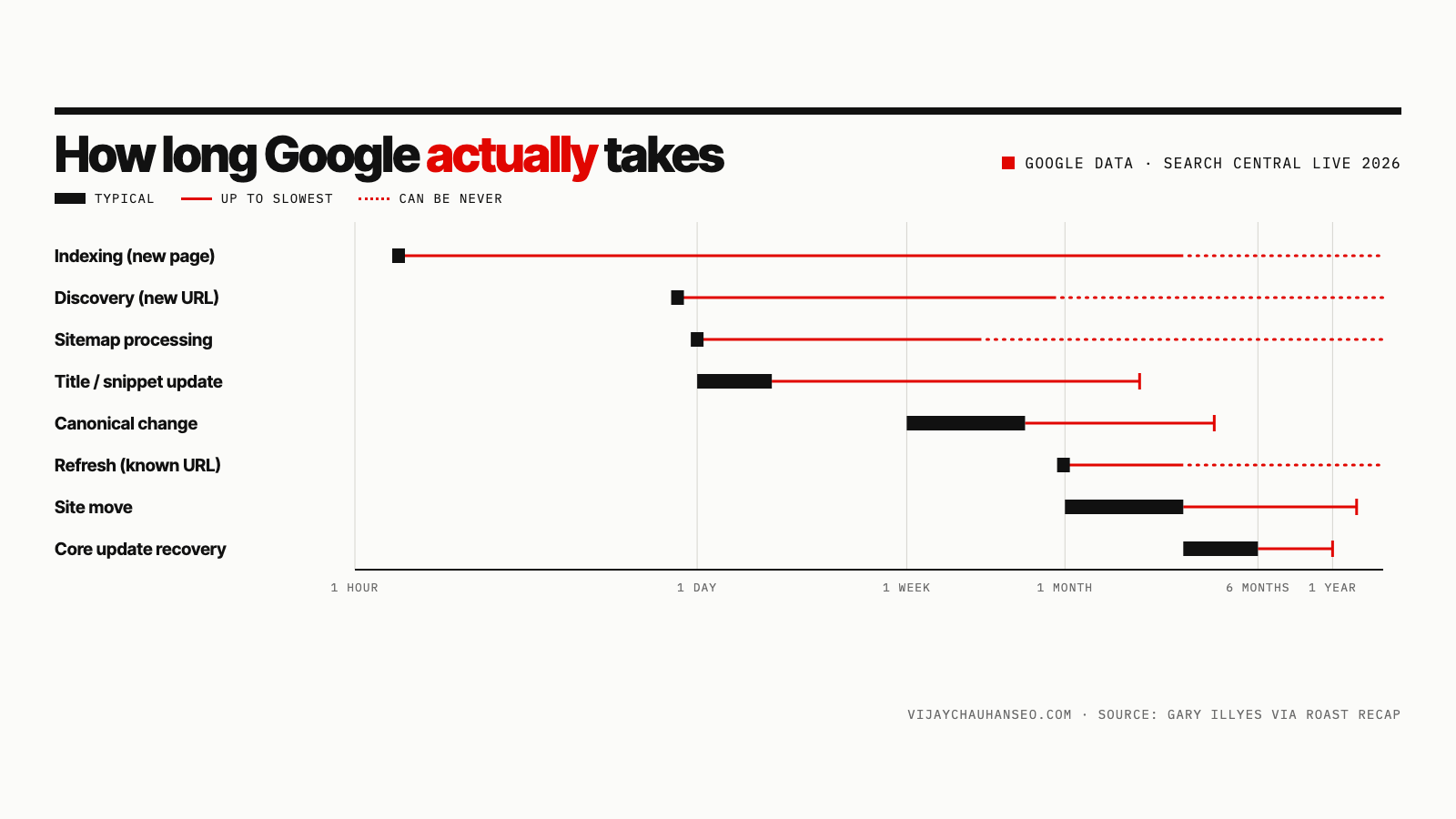
On October 2, 2026, at Search Central Live Deep Dive Europe in Barcelona, Google's Gary Illyes put numbers on it. He showed Google's own internal analysis of how long 27 Search processes take, from discovering a new URL to recovering from a core update. For each one he gave a typical time and a slowest time.
The slides aren't public yet. The most complete record is John Campbell's day 3 recap on ROAST, which lists every row. Most coverage so far has reproduced only part of it. Below is the full set, grouped the way Google presented it, plus how I'd use it in practice.
| Process | Typical | Slowest |
|---|---|---|
| Discovery (new URL) | ~20 hours | Weeks, or never |
| Refresh (known URL) | ~30 days | Weeks, or never |
| Sitemap processing | ~24 hours | Up to 14 days, or never (quality) |
| robots.txt update | ~24 hours | 25 hours |
| Crawl capacity update | 4 hours to 1–2 weeks | 1–3 weeks (in recovery) |
| Crawl demand update | ~20 hours | Weeks to months |
Two rows here matter more than they look.
Refresh at ~30 days is the one that catches most teams out. Discovery of a brand-new URL is fast, but Google doesn't revisit known URLs that often. If you rewrite an old article and nothing changes for two weeks, that's normal. Google may simply not have fetched it again yet.
Crawl capacity is how hard Google is willing to hit your server. According to the recap, it can drop in seconds when Google backs off, for example when your server starts returning errors or slowing down, but it takes from hours up to a couple of weeks to come back. One bad deploy that causes 5xx errors can slow crawling for much longer than the outage itself lasted.
The robots.txt row is the most predictable thing on the list: about a day, and never more than 25 hours. If a robots.txt change hasn't taken effect after a day, check the file is actually live, rather than waiting.
| Process | Typical | Slowest |
|---|---|---|
| Rendering | Seconds to render, hours in the queue | Days to weeks |
| Meta annotations | 45–90 minutes | 1–4 days |
| Link annotations | Minutes to 1–3 weeks | Months |
| Indexing (end to end) | ~1.5 hours | Months, or never (quality) |
| Removal | 1–3 weeks | Months |
| Canonicalization change | 1–3 weeks | Months (conflicting signals) |
| Site move | 1–3 months | 6 months to 1 year+ |
| Structured data updates | Hours to 1–2 weeks | Weeks, or never (quality) |
| Images | Hours to days | Weeks to months |
| Videos | Hours to days | Weeks to months (deep analysis) |
"End to end" here means every critical indexing process has finished. A few things stand out:
| Process | Typical | Slowest |
|---|---|---|
| Removal in Search Console (site owner) | ~2 hours | 24 hours |
| Snippet update | 1–2 days | Several weeks to months |
| Title update | 1–2 days | Several weeks to months |
| Text result image update | 1–2 weeks | Several weeks to months |
| Manual action removal | 1–2 weeks | 4–6 weeks, or much longer for dormant sites |
| Core update change | 3–6 months to recover | 6 months to 1 year (next core update) |
| Spam update change | 1–2 weeks (continuous) | Months (batch refreshes) |
Gary also gave rollout lengths: core updates take 2–4 weeks to roll out, and spam updates take 1–2 days.
The core update row is about recovery, not the rollout. It lines up with Google's core updates guidance, which says some changes "can take effect in a few days, but it could take several months" for Google's systems to confirm a site has improved, and that if you see nothing after a few months, you may be waiting for the next core update.
Spam updates work differently. Their effects can update continuously, typically within one to two weeks, but some changes only land in periodic batch refreshes that can take months. If you're tracking an update's impact, my Google volatility tracker shows when the rollouts actually moved rankings.
Gary's main caveat was that these processes are linked. A page can't be indexed until it's crawled, and a new title can't show until the page is reprocessed. So the real wait for a change is often the sum of several rows, not one.
An example: you rewrite the title of an existing page.
So "titles update in 1–2 days" can mean several weeks in practice, if Google hadn't planned to revisit that page soon. That's my reading of how the rows connect, not something Google spelled out. It explains why requesting indexing in Search Console after an important change still makes sense: it lets you skip the wait for step 1.
The same logic explains site moves. Google has to recrawl every old URL to see the redirect, and a ~30-day refresh cycle across thousands of pages adds up quickly.
Look at the slowest column: "never" appears five times, for discovery, refresh, sitemap processing, end-to-end indexing and structured data updates. Three of those come with "(quality)" in brackets.
Put plainly, if Google doesn't think a page is worth it, technical fixes won't speed anything up. A perfect sitemap won't get thin or duplicate pages indexed. If your pages sit in "Discovered – currently not indexed" or "Crawled – currently not indexed" for months, treat it as a content and site-quality problem, not a crawling problem.
This is how I'd use the data with clients: as a point to start investigating, rather than a deadline.
| If this hasn't happened... | Start investigating after | Check first |
|---|---|---|
| New page discovered | A few days | Internal links to it, and whether it's in the sitemap |
| Edited page recrawled | ~4–6 weeks | Request indexing; check how often Google crawls the site in Crawl stats |
| Sitemap read | 14 days | Sitemap errors in Search Console; whether the URLs are worth indexing |
| robots.txt change picked up | 25 hours | The live file at /robots.txt and the robots.txt report |
| Canonical change settled | 3 weeks | Conflicting signals: internal links, sitemap, redirects, hreflang |
| Title or snippet updated | A few weeks | Whether the page was recrawled; whether Google is rewriting the title |
| Site move settled | 3 months | Redirect chains, old URLs still linked internally, Change of Address tool |
| Manual action lifted | 6 weeks | The reconsideration request status in Search Console |
| Core update recovery | 6 months | Whether improvements were site-wide; the next core update date |
These numbers come with real limits, and it's worth being upfront about them:
Treat them as reference points from Google, not guarantees. Big, frequently updated sites will sit at the fast end; small or low-quality sites at the slow end.
Google typically discovers a new URL in about 20 hours and completes indexing in about 1.5 hours after crawling it. In the slowest cases it takes weeks, and some pages are never indexed, usually because of quality.
Typically about 30 days for a URL Google already knows. Requesting indexing in Search Console's URL Inspection tool can speed this up for important pages.
Typically one to three months. Small sites can finish in a few weeks, and the slowest moves take six months to over a year. Keep redirects in place for at least a year.
Typically three to six months after you make improvements. In the slowest cases recovery only shows at the next core update, six months to a year later.
Typically one to three weeks. It can take months when your canonical signals conflict.
Sources: John Campbell, ROAST — Search Central Live Deep Dive Barcelona, Day 3 recap (Oct 2, 2026), reporting Gary Illyes' session; Google Search Central documentation linked above.
A technical SEO audit finds what’s slowing crawling, indexing or a migration down, and what to fix first.
Get a technical SEO audit